Why Your AI Coding Agent Fails on Legacy Code (And How to Fix It)
AI can generate code faster than ever, but that speed collapses the moment it hits a real, messy codebase. The problem isn’t the model’s intelligence, it’s the context it’s given. This piece breaks do

Every engineer has had this conversation. A stakeholder walks in, thrilled that they prototyped a feature with Claude over the weekend, and asks why shipping it will take two weeks. The developer mutters something about tests, security, and maintainability. The stakeholder leaves wondering if the developer is just slow.
The frustrating part is that the developer isn’t wrong - and they know the stakeholder isn’t either. They’ve shipped their own weekend prototypes with Claude. They’ve seen the speed firsthand. But that speed evaporates the moment the work moves to a legacy codebase, and they can’t always explain why.
Both are right, and both are missing the real story. Vibe-coding works on greenfield projects. It stalls on legacy ones. The question is why - and the answer is not model capability.
The gap is measurable. One large 2025 analysis of 211 million changed lines of code found that AI-heavy coding environments were adding far more code than they were restructuring. Refactoring, measured as moved code, fell from 25% of changed lines in 2021 to less than 10% in 2024, while copy-pasted code rose from 8.3% to 12.3%. A separate randomized controlled trial found that experienced open-source developers working on repositories they already knew were 19% slower with AI, even though they expected AI to make them faster. That is a very important clue. The problem is not just code generation. It is code understanding.
First, let find Mr Stark
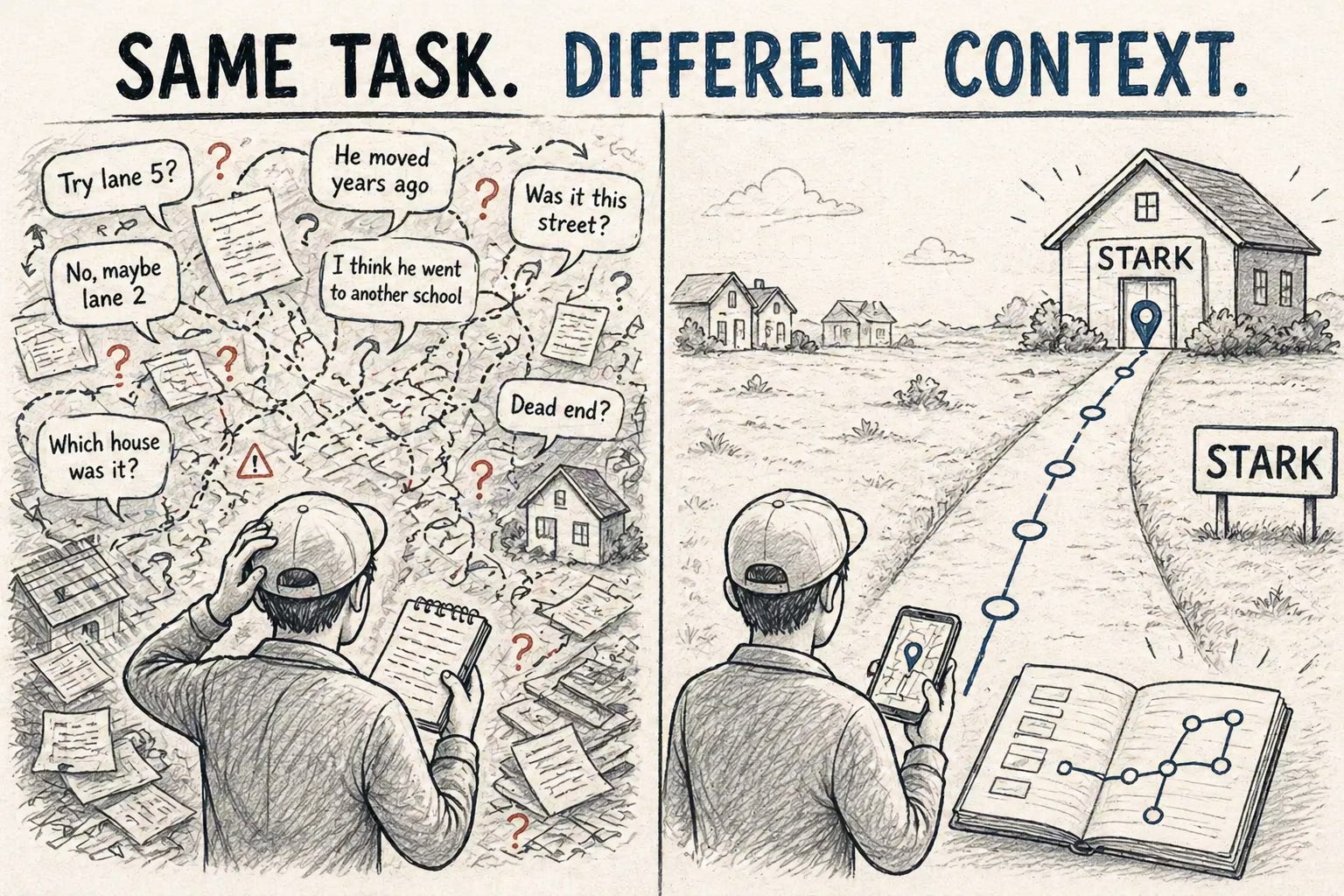
Imagine you are sent into an entirely new neighbourhood and you are supposed to look for Mr. Tony Stark and gather every bit of information about him. This is a big town, so you start with the first house, ask them if they know about Mr. Stark, and they give you some hint that this person might stay in lane 5. You note it down and move ahead.
Then in lane 5 you start with the first house. They redirect you to another lane, then another house where they tell you in depth about the person’s hobbies as they were golf buddies in school, but now they do not know where he lives. You keep noting it down until you run out of pages. That’s the rule of the game: you only get so many.
Asked to summarize, you’d give a confused answer. Most of your pages are filled with detours.
Let’s imagine an alternate situation. Same task, same constraints, but this time you have a phonebook. Yes, the thing that existed a couple of years back that contained contact information about people. You look up Mr. Stark, give him a phone call asking him for his address. On your visit, you note everything Mr. Stark had to say about himself and he gives you contacts of Miss Potts and Mr. Parker. You finish the task with pages to spare.
Now you might wonder, great story, how does it solve the challenge of the puzzled developer?
The answer is in our story. Coding agents, when asked to complete a task in a legacy repository, go through the same challenge as we did in identifying which files to change, where to change, and what could be the blast radius of the change. So, what can we do so we can give a phonebook to the agent? Context engineer it.
What is context engineering
Prompt engineering is about what you ask.
Context engineering is about what the model already knows before it starts working.
Every model, like the notepad constraint we had, has a constraint on the number of tokens it can process at once, the context of the model. How much context can the model retain, how many pages were we allowed to write in the notepad.
So when we provided the legacy application with hundreds of thousands of lines, the agent spun as we did.
And this is not just a theory problem. Long-context performance degrades in measurable ways. Multiple recent studies show that bigger context windows do not solve the core challenge. One benchmark found that at 32K tokens, 11 of 13 models fell below 50% of their short-context baseline when the task required semantic retrieval instead of simple word matching. Another large context study across 18 models found that performance worsens not just with length, but with distractors and coherent documents that can pull the model into the wrong narrative. So yes, context windows are growing. But noisy context still remains noisy context.
OpenAI created a team that is supposed to work full Codex only, no manual coding. And that experiment led to a lot of interesting insights. Once they scaled up, they realized the hard part was not model capability. The hard part was building the environment, structure, and feedback loops that let the agent do reliable work.
In fact, that internal experiment says the team built and shipped an internal beta with 0 lines of manually written code, in about 1/10th the time hand-coding would have taken. Five months later, the repository had around a million lines of code, about 1,500 merged pull requests, and average throughput of 3.5 PRs per engineer per day. That is exactly the kind of shift this article is talking about. The bottleneck is no longer only “can the model code?” The bottleneck becomes “can the system around the model keep that coding reliable?”
If your agent sees:
the wrong files
stale docs
too much noise
no quality checks
then even a very good model will behave badly.
They described this clearly. They say context is scarce, and that a giant instruction file crowds out the actual task, code, and docs the agent really needs. They also found that too much guidance turns into non-guidance, because when everything is important, nothing is.
That is why context engineering matters more than prompt cleverness in serious engineering workflows.
Let’s talk about Context Engineering for a minute:
Context Engineering is the art and science of filling the context window with just the right information for the next step.
But context windows are increasing, would it stay relevant?
Context has really increased from 4k tokens to 1M and even more, but even with the increased context, there is still a ceiling on the number of tokens a model can process. Not to forget the other aspects like latency, cost and quality.
OpenAI’s own context-management notes spell out why this matters in practice. Focused context keeps the agent anchored to the current goal instead of dragging along stale plans, and it sharpens tool-call accuracy, fewer retries, fewer cascading failures across multi-tool runs. It cuts latency and cost because smaller prompts mean less attention load. It contains errors: summaries act as clean rooms that omit earlier mistakes instead of amplifying them turn after turn (the “context poisoning” problem). And it makes debugging tractable bounded histories and stable summaries give you logs you can actually diff, so regressions become reproducible instead of mysterious. In multi-issue chats, per-issue summaries also let agents pause, resume, or hand off cleanly to humans or other agents.
You would have realized something interesting now. We are essentially saying that to get the full benefits, we need to make some changes to the way code repositories are organized, how data is represented. In other words, we need to reimagine what the codebase would look like if agents were the first-class citizens of the repositories, aka Agent First Repositories.
Let’s explore what are the crucial components of agent-first repos.
1. AGENTS.md
A lot of teams discover agents, get excited, and do the obvious thing: they create one giant AGENTS.md file and dump every rule into it.
That sounds reasonable.
It usually fails.
Experiments have suggested that the one big AGENTS.md approach failed in predictable ways. It wasted scarce context, became stale quickly, and was hard to check mechanically for freshness, structure, and ownership. The fix was to make AGENTS.md short and use it more like a table of contents than an encyclopedia.
That is a very important design lesson.
The job of the top-level markdown file is not to explain everything.
Its job is to say:
start here
here is the architecture
here are the deeper docs
here are the rules
here is how to work safely
Think of it like the phonebook in our example.
You did not ask the phonebook for the daily habits of Mr. Stark.
You referred to the phonebook to know where to go.
That is what AGENTS.md should do.
So how do markdown files actually help with context?
Here is a simple example.
Let us say you have this repository:
AGENTS.md
ARCHITECTURE.md
FRONTEND.md
RELIABILITY.md
docs/
 product-specs/
   login-flow.md
exec-plans/
   active/
     mobile-safari-auth-fix.md
generated/
   auth-schema.md
Now imagine the agent is asked to fix the mobile Safari login issue.
Without structure, the agent may scan:
random frontend files
old tickets
auth code
callback handlers
config
tests
maybe even unrelated session code
That is expensive and messy.
With structure, the flow becomes much cleaner:
AGENTS.md says:
read ARCHITECTURE.md
if auth issue, read docs/product-specs/login-flow.md
if browser-specific login issue, check active execution plans
follow FRONTEND.md conventions
update docs if auth behavior changes
login-flow.md explains:
which files own the sign-in flow
which callback route matters
which browser quirks are already known
mobile-safari-auth-fix.md says:
current hypothesis
what has already been tried
known failures
acceptance criteria
This does two things at once.
First, it reduces noise.
Second, it increases trust.
The agent no longer has to guess where the truth lives.
That is exactly how the strongest agent-first teams describe their setup. They keep repository knowledge in a structured docs/ directory, use a short AGENTS.md as an entry point, version execution plans inside the repo, and rely on progressive disclosure so the agent starts small and is taught where to look next.
This is why markdown files matter.
They are not extra documentation.
They are context routing infrastructure.
2. Add SKILLS
A simple way to think about a skill is: a reusable packet of engineering taste
For example:
a frontend skill can say how components should be built
a backend skill can say how errors should be logged
a testing skill can say how mocks and fixtures should be used
a migration skill can say how database changes should be planned and rolled back
Now the agent is not just writing code.
It is writing code the way your system expects.
That reduces randomness.
There is also a reason skills work better than giant global instruction files. Good skill systems use progressive disclosure. The agent first sees the metadata, then loads deeper instructions only when that skill is actually relevant. That keeps context smaller while still making specialized workflows available on demand. In other words, skills do not just store engineering taste. They also protect attention.
3. Enforce documentation
Everyone knows that under pressure, when code is changed, comments are often left unchanged and that later causes confusion for human readers. Similarly, a lot of documents go stale. And for agents, that matters more than it does for humans. A human can sometimes notice that a doc is stale. An agent often cannot. It will simply treat the stale doc as truth and go in the wrong direction.
So, one way out is to let the agent revise all the documents that the agent refers to. Example, in the latest set of changes, if architecture is changed, then the agent should modify the ARCHITECTURE.md too so it does not go stale.
But can we enforce this? This is a puzzling question. Few things that can be tried are:
For example, a pre-push hook can do something like this:
detect changed files
map them to required docs
fail the push if the linked markdown files were not updated
A stronger version can go one step further:
detect changed files
ask an agent to draft the doc update
show the diff to the engineer
then allow the push
That keeps the docs alive.
And we now have a strong public case that this is not overengineering. The same OpenAI engineering post says they enforce the knowledge base mechanically through linters and CI, and even run a recurring doc-gardening agent that scans for stale documentation and opens fix-up pull requests.
In other words, the documentation ecosystem of the agent needs to be a live wiki that keeps getting edited by agents so it can perform its best.
4. TDD (test-driven development)
Test-Driven Development (TDD) is a technique for building software that guides software development by writing tests. It was developed by Kent Beck in the late 1990s as part of Extreme Programming. In essence we follow three simple steps repeatedly:
Write a test for the next bit of functionality you want to add.
Write the functional code until the test passes.
Refactor both new and old code to make it well structured.
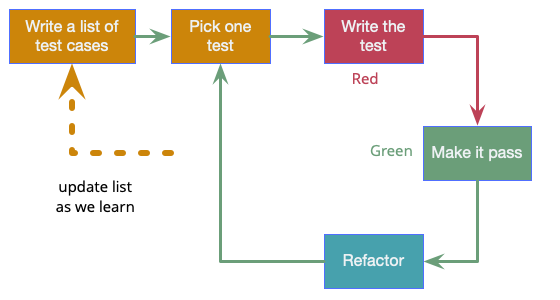
Image Credits: Martin Fowler
In AI-assisted coding, the discipline of TDD has become more relevant. Agents work best when they have clear exit criteria. Without a test-first approach, AI agents often fall into the trap of AI Slop and AI Smells, generating massive blocks of code that look correct but suffer from hallucinations or hidden bloat.
By instructing an AI agent to write the test first, we provide the guardrails necessary to keep the agent focused. This forces the AI to provide the minimal, functional implementation required, effectively preventing accidental complexity. TDD transforms the agent from an unpredictable tool into a disciplined engineering partner that iterates until it achieves a deterministic, verified result.
Another benefit is:
Tests are not only for checking correctness. They are also a form of living documentation. They show what the system is supposed to do, and if they are hard to write, that is often a signal that the interface itself is hard to use.
That means a good test tells two stories at once:
what the software should do
how the software is meant to be used
This is especially useful for agents.
Tests close the loop on what the agent wrote. But unit tests only cover what the agent thought to test. For UI work especially, “all tests pass” can still mean “the button doesn’t actually work.” This is where browser-level MCPs like Playwright become a natural extension of TDD.
A Playwright MCP lets the agent drive a real browser: load the page, click through the flow, read console errors, take screenshots, verify the rendered output. Combined with TDD, this turns the agent’s loop into something stronger: write the test, write the code, run the unit tests, then exercise the actual UI and confirm the user-facing behavior. If the click handler throws, the agent sees the console error and iterates. No human needs to be in the middle.
The same principle extends to backend work. An MCP that tails application logs or queries an observability tool lets the agent verify its fix actually behaves correctly under realistic conditions, not just in isolation. The shape is identical to TDD - define what success looks like, then verify against ground truth - but the ground truth is now runtime behavior, not just a green checkmark.
5. Add Knowledge graphs
A code graph represents the structure of a codebase as a graph. It models code entities as nodes and their relationships as edges. This structure lets developers observe how parts of a system relate to one another without manually inspecting numerous files or tracing connections across the codebase.
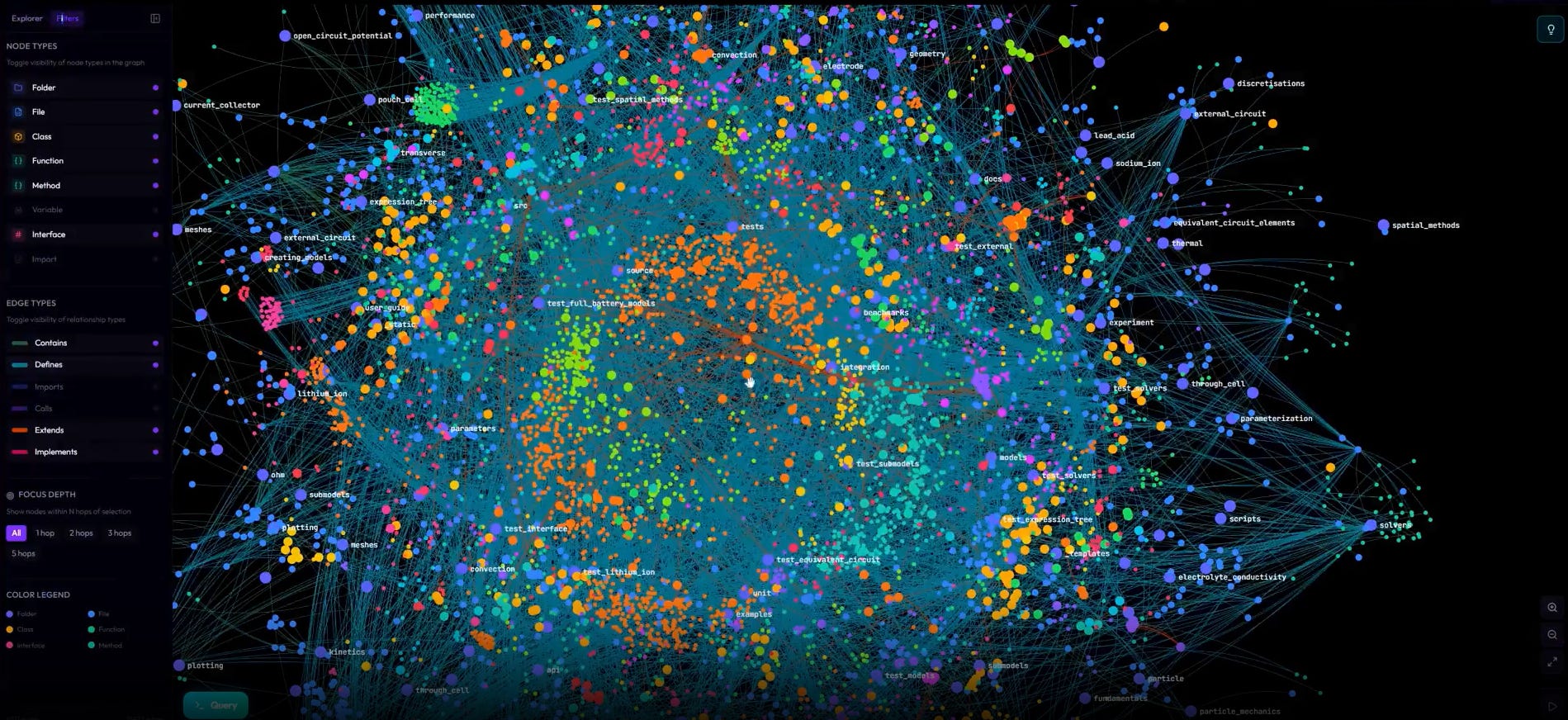
Image Credits: GitNexus
This is a gold mine for agents, as they can quickly query the code graph, understand the dependencies and the blast radius of code changes, and hence prevent accidental misses.
To make this concrete: imagine an agent is asked to rename a method called process_payment. Without a graph, it greps the repo, finds 40 matches, and has to read each one to figure out which are real call sites, which are string references in logs, and which are unrelated methods with the same name. With a graph, it issues one query “all callers of PaymentService.process_payment” and gets back the exact 12 nodes that matter. The token cost drops by an order of magnitude, and the chance of missing a caller drops to near zero.
The same principle applies to harder questions: “What breaks if I change this function’s return type?”, “Which services depend on this database table?”, “Is this module safe to delete?” These are the questions that consume most of a senior engineer’s time in a legacy repo, and they are exactly the questions a graph can answer in milliseconds.
Even if you do not build a full-blown knowledge graph, code navigation systems already point in this direction. GitHub code navigation explicitly links definitions to references across a repository and uses Tree-sitter to support structured traversal. Tools like Sourcegraph, Glean (Meta’s internal system), and open-source projects like ast-grep and tree-sitter give you most of the value without the overhead of standing up a graph database. That is exactly the kind of help an agent needs when it is trying to figure out what calls what, where something is defined, and what could break.
The practical pattern most teams can leverage: expose the graph as an MCP server or a CLI the agent can call. The agent does not need to load the graph into context, it just needs to know that a find_callers tool exists and trust the result. This is context engineering at its purest: keep the data out of the prompt, keep the answers in the prompt.
This is one step more granular than the AGENTS.md, helping save context while maintaining code-exhaustive changes.
6. Connect the agent to business context
Everything so far lives inside the repository. But the most important context gap sits entirely outside it.
The reason a piece of code exists is rarely in the code itself. It is in the Linear ticket that triggered the work, the Slack thread where the bug was first reported, the PR description that explains why a function is changing.
A benchmark, ContextCRBench, measured this directly. They evaluated eight leading LLMs (including GPT-4o and Claude 3.5 Sonnet) on code review tasks with and without business context. The results:
Adding the PR description alone boosted F1 by 72.17%.
Adding issue + PR descriptions pushed it to 79.93%.
Adding only code context (the surrounding function) gave a smaller 63.79% gain.
Telling the model why a change was being made helped more than showing it more code.
Their case study makes it concrete. Claude 3.5 Sonnet was asked to review a diff from the Elasticsearch repo. Without context, it confidently rejected the change - its reasoning was textbook software engineering. Sound logic, wrong answer. Given the linked issue and PR, which explained the removed field was intentionally transient for cross-cluster search, it correctly approved the change. Same model, same code, opposite verdict. The only thing that changed was access to business reasoning.
The implication: the agent’s context boundary cannot stop at the repo edge. MCP servers connecting to Linear, Jira, and Slack are not nice-to-have integrations, they close the highest-leverage context gap that exists. The pattern is the same as everything else we talked about: do not stuff the context into the prompt. Give the agent a way to fetch it on demand.
This raises the bar on documentation discipline too. A two-line ticket that says “fix login bug” is no longer just bad project management - it is a measurable degradation in your agent’s output. Detailed tickets and clear PR descriptions are not overhead in an agent-first workflow; they are runtime context the agent actually reads.
One caveat. The same study found open-source models sometimes performed worse with extra context - attention got diluted, precision dropped. More context is not automatically better context. The goal is to give the agent the right business context, on demand, through tools it can call. That is the difference between context dumping and context engineering.
The simplest way to think about all of this
If I had to explain the whole idea in one line, I would say this:
A normal repository stores code. An agent-first repository helps an agent think.
That is the difference.
And once you start looking at it this way, a lot of design choices become obvious:
small AGENTS.md, not giant AGENTS.md
deeper markdown docs for the right domains
execution plans in the repo
skills for repeatable behavior
git hooks and CI to keep docs fresh
tests first, especially for agent-written code
observability and browser checks that the agent can use directly.
And maybe the biggest takeaway is this: better models increase the value of good context. They do not remove the need for it.
“Think about the thing that the model wants to do and figure out how do you make that easier” - Boris Cherny, Creator of Claude Code
What a thoughtful piece, this one made me pause and rethink how I’m using AI in my own workflow.
Great read!! this really sharpened my understanding of why context, not capability, is the real blocker for AI in legacy codebases.